HashMap使用Hash Table,因而它有自己的排序方式,若要使用插入的順序來排序,則可以使用LinkedHashMap,
TreeMap實作Map介面與SortedMap介面,提供相關的方法讓您有序的取出對應位置的物件,像是 firstKey()、lastKey()等方法,TreeMap是J2SE中唯一實作SortedMap介面的類別,它使用紅黑樹結構來對加入的物件進 行排序。
2015年12月28日 星期一

2015年12月27日 星期日
使用jquery get select value
<select id="test" />
<option value="0">請選擇</option>
<option value="1">中文</option>
</select>
$("select[name='test']").val();
<option value="0">請選擇</option>
<option value="1">中文</option>
</select>
$("select[name='test']").val();
2015年12月26日 星期六
eclipse alt+/ 無反應的解決方法(Content Assist)
換個版本的eclipse發現alt+/無反應
原因是eclipse每個版本的熱鍵都有些微的不同

解決方法:
1. 將 word completion 的快捷鍵改為其他的.
例如 ALT + C (預設是 ALT + /)
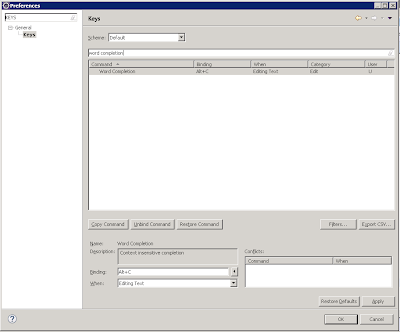
2. 把 content assist 的快捷鍵由 Ctrl + space(跟windows key衝突) 改成 ALT + /

原因是eclipse每個版本的熱鍵都有些微的不同

解決方法:
1. 將 word completion 的快捷鍵改為其他的.
例如 ALT + C (預設是 ALT + /)

2. 把 content assist 的快捷鍵由 Ctrl + space(跟windows key衝突) 改成 ALT + /

2015年12月19日 星期六
使用maven jetty開發,發生java.io.FileNotFoundException
在啟動本機開發環境時,發生java.io.FileNotFoundException
到對應專案webapp資料夾內空空如也,應該要有一堆編譯過後的檔案(*.xml,*.class...等)
代表此時環境所有編譯過的檔案都被清除,所以在啟動jetty時後面應該要接run,jetty才會生成檔案
到對應專案webapp資料夾內空空如也,應該要有一堆編譯過後的檔案(*.xml,*.class...等)
代表此時環境所有編譯過的檔案都被清除,所以在啟動jetty時後面應該要接run,jetty才會生成檔案
2015年12月13日 星期日
在eclipse的project explorer區塊調整字體大小
使用eclipse版本:Luna Service Release 1 (4.4.1)
確認自己的theme的樣式,Preferences\General\Appearance\theme
這裡使用windows 7,Color and Font theme:Default
相對路徑下:
\eclipse-luna\plugins\org.eclipse.ui.themes_1.0.1.v20140819-1717\css\e4_default_win7.css
在檔案最後面加上,重開eclipse
#org-eclipse-jdt-ui-PackageExplorer Tree,
#org-eclipse-ui-navigator-ProjectExplorer Tree,
#org-eclipse-ui-views-ContentOutline Tree,
#PerspectiveSwitcher ToolBar {
font-size: 10px;
}
確認自己的theme的樣式,Preferences\General\Appearance\theme
這裡使用windows 7,Color and Font theme:Default
相對路徑下:
\eclipse-luna\plugins\org.eclipse.ui.themes_1.0.1.v20140819-1717\css\e4_default_win7.css
在檔案最後面加上,重開eclipse
#org-eclipse-jdt-ui-PackageExplorer Tree,
#org-eclipse-ui-navigator-ProjectExplorer Tree,
#org-eclipse-ui-views-ContentOutline Tree,
#PerspectiveSwitcher ToolBar {
font-size: 10px;
}
訂閱:
文章 (Atom)